

In my previous blog, I talked about what Cybersecurity & SOC are. Now let’s go one step deeper.
One question beginners always ask is ;
“How does a SOC actually detect attacks ?”
Do SOC analysts stare at screen and magically catch hackers ??
No, it’s much more logical, boring and interesting at the same time.
Most detections in a SOC revolves around Logs & a tool called SIEM.
some common SIEM platforms are ; Splunk, IBM QRadar, Microsoft Sentinel, ArcSight, etc.
It’s how a SIEM looks like ; (this one is Splunk Interface)
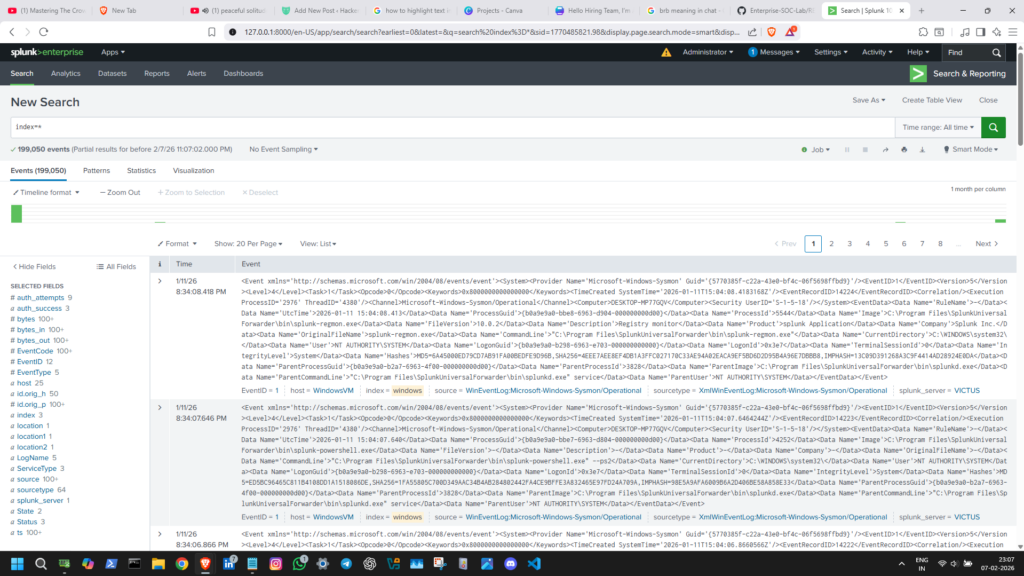
What SIEM actually is ??
SIEM stands for Security Information & Event Management.
SIEM is a platform that ;
- Collects Logs from different sources.
- Stores them in one place.
- Analyzes them
- Generates alerts when something looks suspicious
SIEM Architecture ;
I am explaining using the example of Splunk SIEM.
There are 3 architecture components in Splunk SIEM ;
- Forwarder – this is the lightweight agent which sits on the source systems. it collects logs/events and ships them. think of it as a delivery agent of logs.
- Indexer – this is the brain that takes the forwarded data, parses it, stores it, and makes it searchable. think of it as a librarian of logs.
- Search Head – this is the interface we interact with. it’s used to query, visualize, and run detections. think of it as a help desk of logs.
What are Logs and where from they come ???
Logs are generated records that a computer or system keeps about what happened with the system. They show events, actions, or errors in clear detail so people can understand the context, trace activity and troubleshoot issues.
Almost every system in IT generates Logs.
Some common SOC-Focused sources ;
- Windows Event Logs (eg ; logon, file creation)
- Sysmon Logs
- Firewall Logs
- EDR (Endpoint) Logs
- Application Logs
- VPN Logs
- Linux auth logs
Example ; Security Logs being generated and stored in Windows Event Viewer.
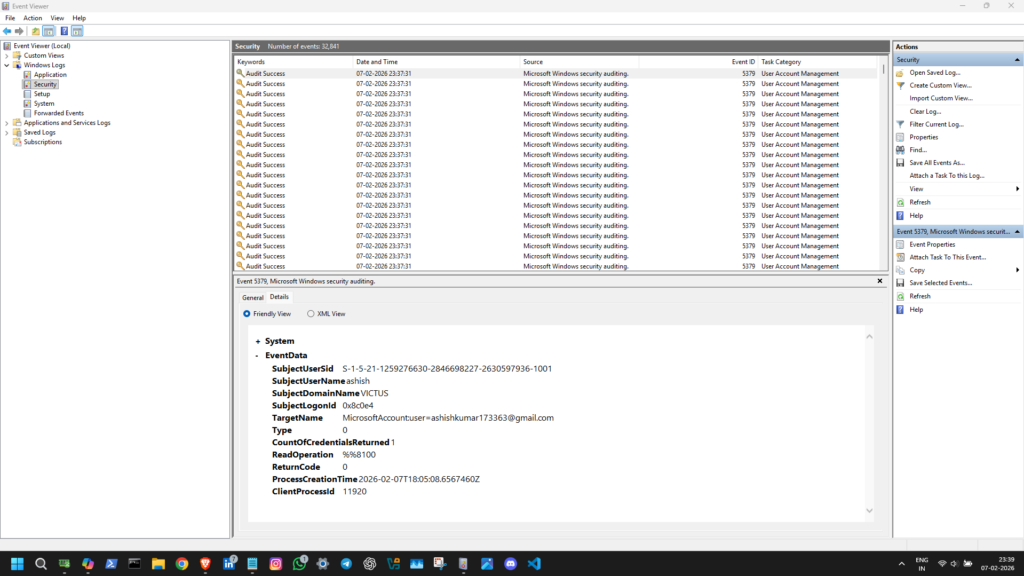
here we can see that logs are being generated continuously. Any single event on the system level will be captured and logged.
Every login attempt (failed or successful), network connection, file creation/modification, etc leaves a trace and that captured trace is the log.
System never forget capturing events & generating logs.
Why SIEM is even needed – Centralization.
someone might think ; why do we even need SIEM, just see the logs in event viewer and catch attacker, so simple !
But, imagine this situation ;
- 500 servers
- 5000 employees
- millions of events per day
the idea will not work here. we need Centralization.
Centralization is one the most important feature of a SIEM.
So, SOC used SIEM to ;
- Pull logs from all systems (Forwarder)
- Normalize them (Indexer)
- Make them searchable (Indexer)
- Correlate events across more more events & systems (Search Head + Human Logic)
Without SIEM, SOC would be blind.
From Logs to Alerts
Logs by themselves are just noise. when we enter a query ;
SIEM applies ;
- Detection rules
- Correlation logic
- Pattern Analysis
and Returns ;
- data which is structured and which we can correlate.
- Alerts (it needs Tunning)
- Dashboards (we need to ask for it)
- even further analysis, we just need to ask.
Example ;
- 1 failed login attempt – normal
- 20 failed login attempts from the same IP – suspicious
- 500 failed login attempts across multiple users – alert
Let’s understand with the help of a query
The query i entered ;
index=ssh_logs
| where auth_attempts > 5
| table ts id.orig_h auth_success auth_attempts
| sort - auth_attempts
the result i got ;
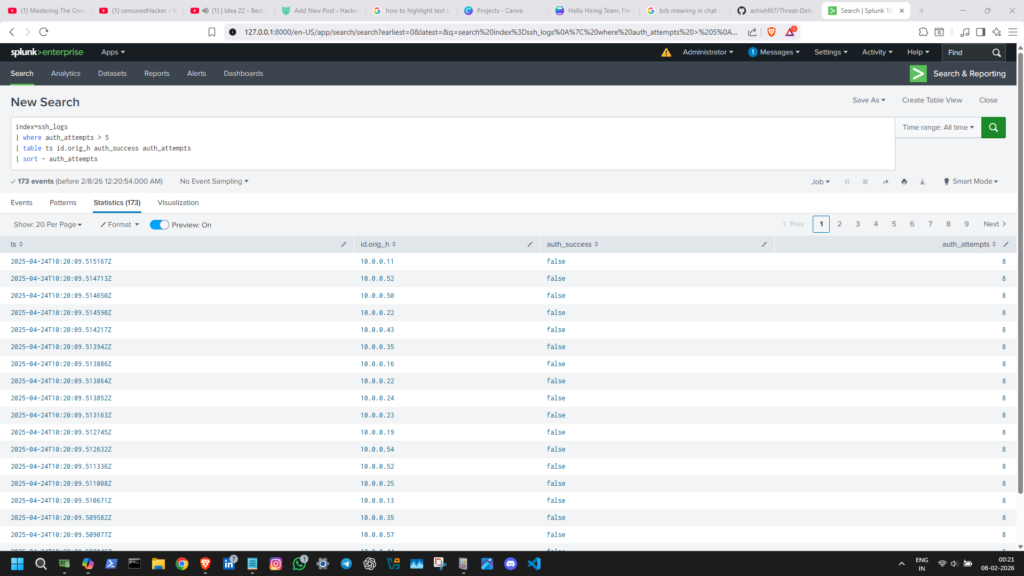
- the results shows a structured presentation of log data, not just Raw & Unstructured log file.
- it shows all the data we asked ; time, ip, auth result & number of attempts.
- it can do even more, we just need to tell it, which we do using a query language (SPL in the case of Splunk).
The SIEM doesn’t say ;
"This is a Hacker"It says :
This activity looks unusual, take a look at this !That’s all.
Alerts are not Attacks
An alert is not proof of an attack.
Most Alerts are :
- Misconfigurations
- User mistakes
- even Legitimate admin activity
- Random harmless actions
These are called False positives.
SOC Analysts spend a lots of time filtering noise.
This is why thinking & tuning matter.
What a SOC L1 Analyst does with a SIEM Alert ?
with the L1 perspective, the follow is usually ;
- Alerts appears in the SIEM.
- Marks the alert as – In Progress
- Analyst check the alert details
- Looks at related logs
- Derive Context – user, time, system, location, etc
- Decides whether ; Close the Alert or Escalate to the senior team (usually SOC L2 Analyst)
- Documents Everything
This workflow is called Initial triage.
Why Humans Are Still Needed
SIEM is powerful, but not intelligent by itself.
It can’t understand ;
- Business Context & Impact
- Human Intention & Behavior
- Further Proceedings
SOC = Human + machine, not only tools.
- Machines provide – Accessibility
- Humans provide – Logic
Attackers change.
Systems change.
Users change.
SOC Keeps ;
- Tuning rules
- Improving Detections
- Learning from Incidents
Final thoughts
SOC is not about chasing hackers.
It’s about understanding systems deeply.
If you are just starting out, don’t worry about knowing every tool.
Focus on ;
- Logs
- Patterns
- Logic
- curiosity
That’s how real detection happens.
One response to “How SOC Detects Attacks”
-
Just read this blog and I must say Ashish Kumar you are super talented at SOC and writing blogs. Got me hooked! It was easy to read and follow along with funny nuggets in between. Great job.




Leave a Reply